
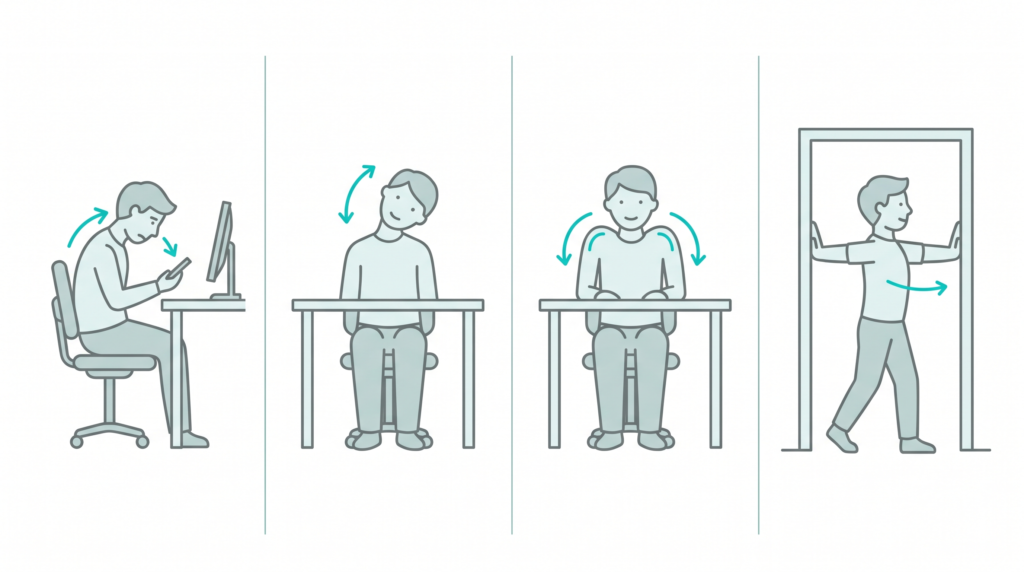

That dull ache between your shoulders. The stiff neck by evening. The headache that creeps up from the base of your skull. You blame your pillow, your age, your stress. But the real culprit is probably in your hand right now — and on your desk all day.
It’s called “tech neck,” and the physics are brutal. Your head weighs about 5 kg when balanced upright. But tilt it forward to look down at a phone, and the effective load on your neck multiplies fast — up to around 27 kg at a typical texting angle. That’s like balancing an 8-year-old child on your neck, for hours a day.
The good news: you can undo a lot of it in five minutes, and set things up so it stops coming back. Here’s how.

The Hidden Weight of Looking Down
A 2014 biomechanical study by spine surgeon Dr Kenneth Hansraj measured how the load on your neck changes as your head tilts forward. The further you bend, the heavier your head effectively becomes:
Now consider that the average person spends two to four hours a day with their head bent over a screen — that’s roughly 700 to 1,400 hours a year of extra strain on your neck. Around 79% of adults report symptoms of text neck. It’s no surprise so many of us ache.
How to Tell If You Have Tech Neck
Common signs include a nagging ache in the neck or upper back, stiffness that’s worse by evening, tension headaches that start at the base of the skull, tight or rounded shoulders, and sometimes tingling down the arms. If your ears sit forward of your shoulders when you stand naturally, your head is living too far forward.
The 5-Minute Reset
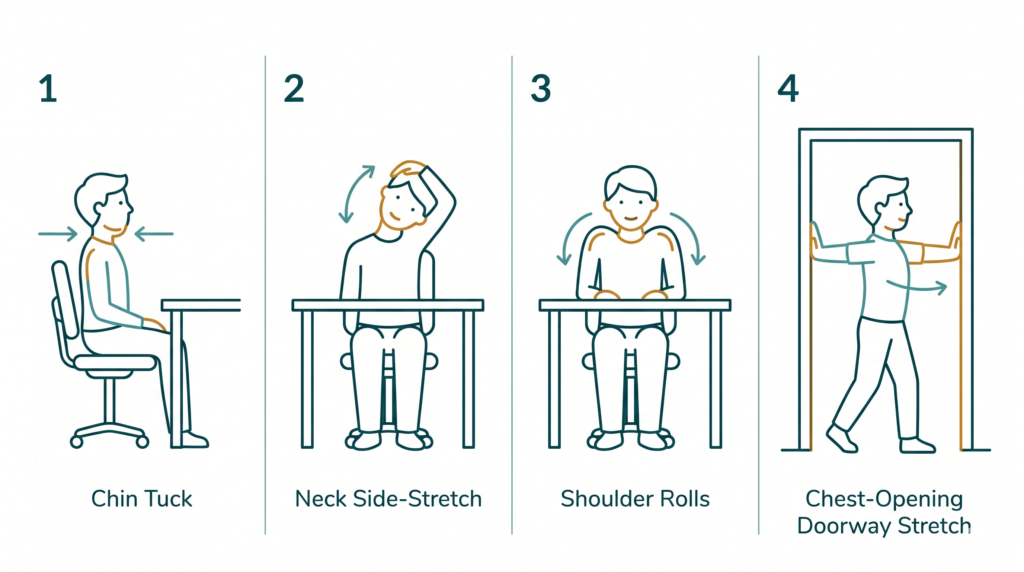
Do this every 30–45 minutes of screen time. Move gently, never into pain:
- Chin tucks ×10 — pull your chin straight back (a gentle double chin), hold 2–3 seconds. This is the single best move.
- Neck side stretch — drop one ear toward that shoulder, hold 20 seconds, then switch.
- Shoulder rolls ×10 — roll slowly backwards to open the chest.
- Doorway chest stretch — forearms on a door frame, lean in gently, 20–30 seconds.
- Seated back extension — hands behind your head, gently arch backwards over your chair.
- Eye reset (20-20-20) — every 20 minutes, look about 20 feet away for 20 seconds.
Fix Your Setup So It Stops Coming Back
Stretches treat the symptom. Your setup is the cure. Quick wins:
| Do this | Why |
|---|---|
| Raise your screen to eye level | So you look slightly down with your head upright, not bent |
| Bring your phone up to you | “The phone comes to me” — stop craning down to your lap |
| Elbows ~90°, use a separate keyboard | Lets the laptop go up high without hurting your wrists |
| Feet flat, support your lower back | Good base posture holds your head in the right place |
| Move every 30–45 minutes | No posture is good if you hold it for hours |
Grab the free one-pager — the full 5-minute reset routine plus the complete desk-setup checklist, ready to print and pin by your screen.
Steal My AI Prompts
Paste into ChatGPT or Claude and swap the [brackets]:
1. Review your desk setup:
Here's my desk setup: [describe your screen height, chair, laptop/monitor, where
your phone sits]. Point out what's likely causing neck or back strain and give me
cheap, specific fixes I can do today.
2. Build a break schedule:
My work hours are [describe]. Build me a realistic screen-break schedule with
gentle reminders to stretch, stand and rest my eyes, without wrecking my focus.
3. Stretches for your specific ache:
I get tension [where, e.g. base of skull / between shoulder blades] after long
screen days. Suggest 4-5 gentle stretches I can do at my desk, with how long to
hold each, and tell me what would mean I should see a doctor.
4. Make the habit stick:
Give me 5 simple cues or habit-stacks to remember good posture and regular breaks
during a busy workday, so it becomes automatic instead of relying on willpower.
Helpful Resources & Products
Trusted reading: NPR’s summary of the “text neck” research behind this article.
- A laptop stand — the single best buy to lift your screen to eye level — [add your Amazon affiliate link]
- An external keyboard + mouse — so you can raise the laptop without hurting your wrists — [add your Amazon affiliate link]
- A lumbar support cushion (or a phone stand) — to hold good posture effortlessly — [add your Amazon affiliate link]
Frequently Asked Questions
Is tech neck reversible?
Caught early, usually yes — better posture, regular stretches and a fixed-up desk relieve most everyday cases. Long-term damage is harder to undo, so it’s worth acting now rather than later.
How often should I take breaks?
Move for a minute or two every 30–45 minutes, and rest your eyes with the 20-20-20 rule. Frequent small breaks beat one long one.
What’s the right screen height?
The top of your screen should sit roughly at eye level, so you glance slightly down while keeping your head balanced over your shoulders.
Will a standing desk fix it?
It helps reduce sitting, but only if your screen height and posture are right. Alternating between sitting and standing is better than either all day.
My neck already hurts — what should I do?
Start the gentle reset, fix your setup, and take regular breaks. But if the pain is persistent, or you notice numbness, tingling or pain running down your arm, see a doctor or physiotherapist.